Every few months I draw the whole setup on one page. Not because anything is finished, but because the drawing shows what the week-by-week work hides: which parts have one job, which parts have three, and where the house would hurt if a machine went away.
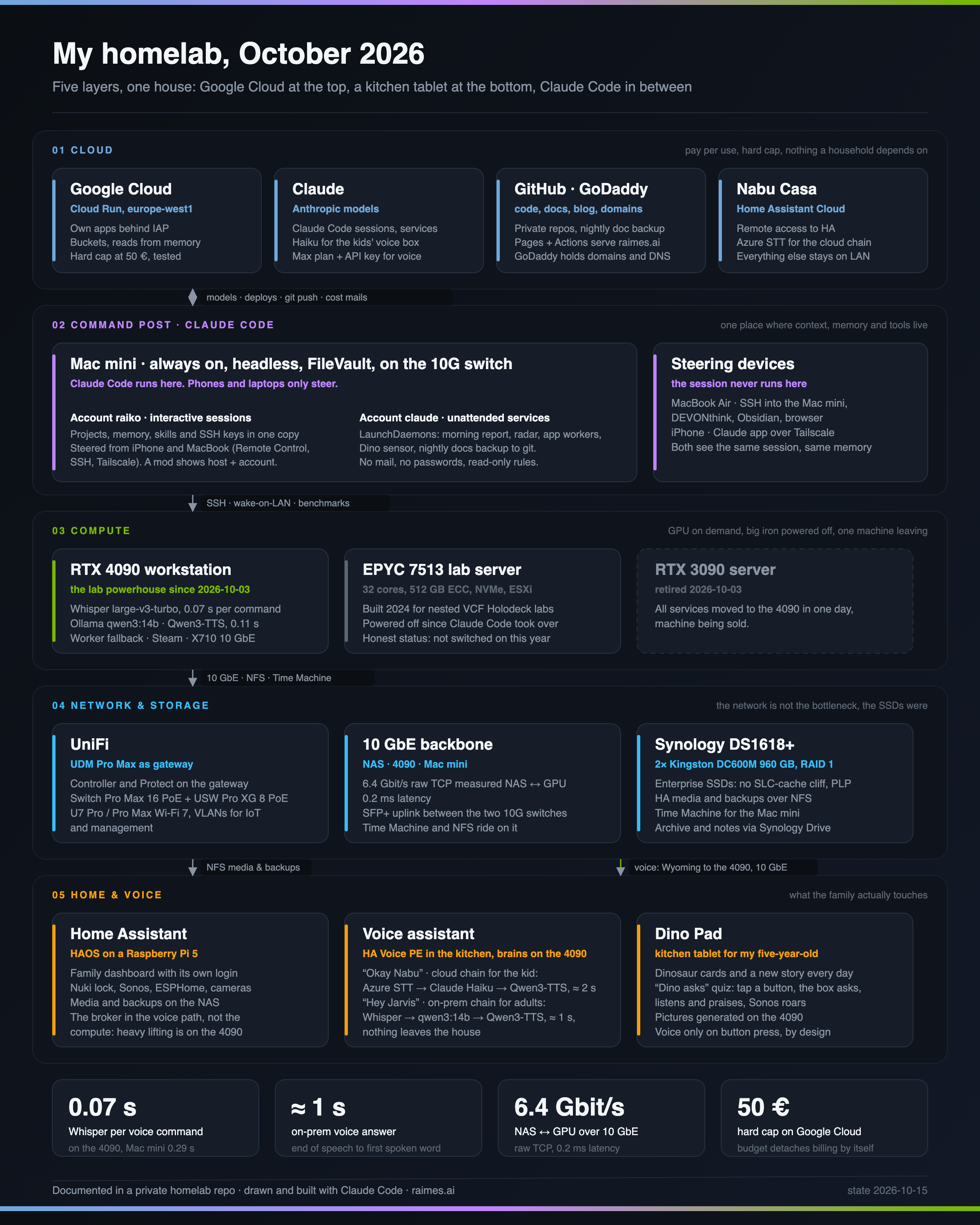
Here is the October 2026 version. Five layers, one house.
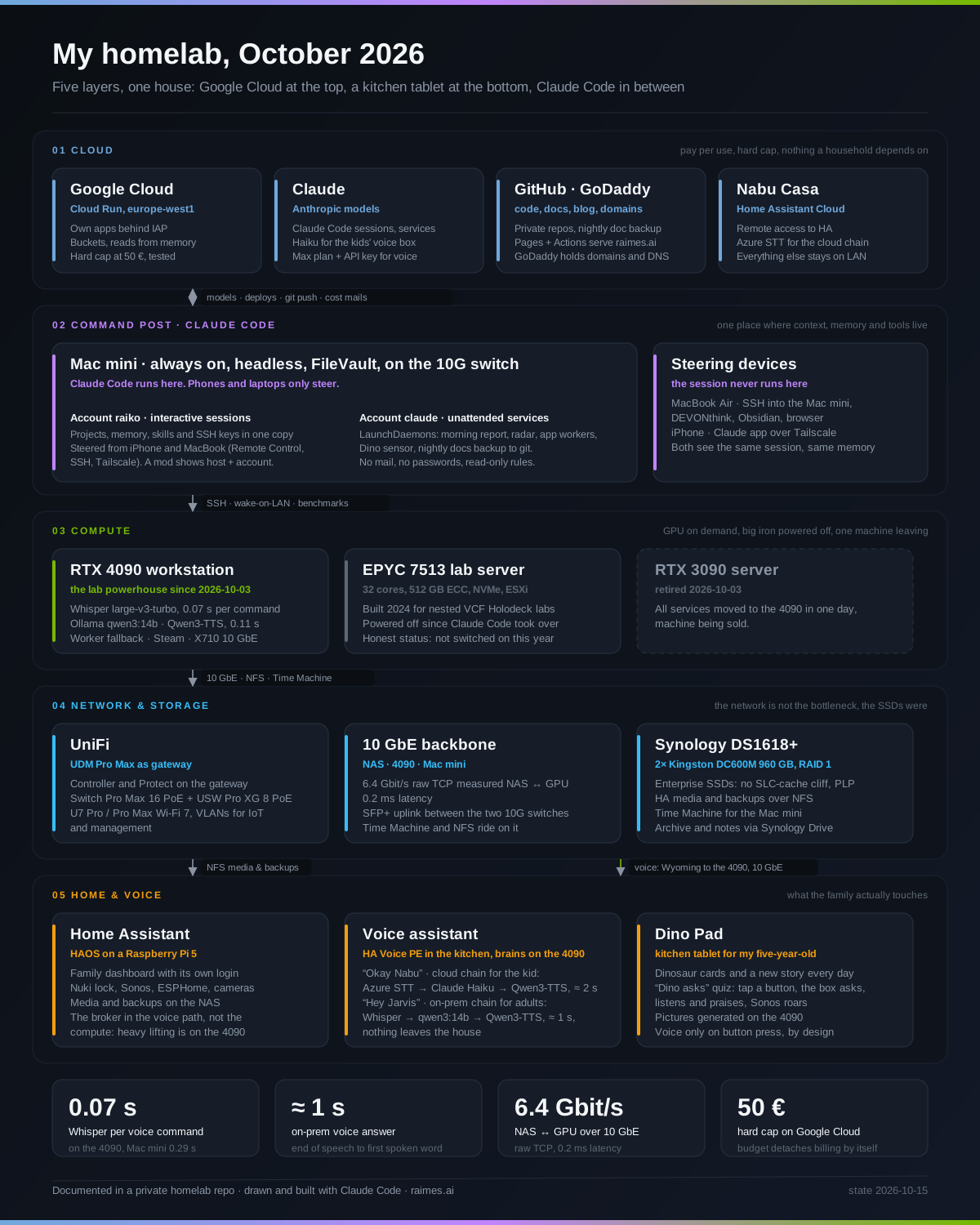
Full-size PNG, 2400 × 3000 px.
Starting point: everything ran on the laptop
Until two weeks ago the MacBook was the centre. It held the notes, the project folders, the Claude Code sessions and the background jobs: the notes sync, the nightly documentation backup, the workers for my cloud apps. When the lid closed, the jobs stopped.
Most of the hardware had been there for years: the UniFi network with 10 Gbit between the racks, the Synology NAS, a GPU server, the EPYC box. This year added a second GPU workstation, a Mac mini and two datacenter SSDs. The hardware was fine. The problem was that the laptop was still the only place that knew everything.
What broke
Three things, each in its own layer.
The context had no home. Claude Code keys its memory to the project folder on the machine where a session runs. With sessions on the laptop and services on the Mac mini, the two machines had two memories, and the services on the Mini could not reach the project folders at all. Every job that needed them needed the laptop open.
The storage lied about its speed. The NAS sat on a 10 Gbit link that measured 6.4 Gbit/s raw. Large copies still crawled. The two consumer SSDs inside started at 459 MB/s and fell to 25 MB/s within three minutes of sustained writes, the usual SLC cache cliff. The network was never the bottleneck. The drives were.
The cloud charged for reads. Two small apps of mine run on Cloud Run with a bucket mounted as a file system. Every directory listing was a billed operation, and a worker that asked “any work for me?” every ten seconds produced about 2.50 € a day with no work at all.
What fixed it
One always-on node holds the context. The Mac mini became the command post. Claude Code runs there, headless, encrypted disk, on the 10 Gbit switch. Two accounts split the roles. One account runs the interactive sessions with full context: projects, memory, skills, SSH keys to every other machine. The other account runs the unattended jobs as LaunchDaemons: morning report, a news radar, the workers for the two cloud apps, a sensor for the kitchen tablet, a nightly git backup of all documentation. That account has no mail, no passwords and read-only rules. The MacBook and the iPhone only steer. The session never leaves the Mini, and a small mod above the prompt shows the host name and account so I can see where I am.
Every other layer got exactly one job. The RTX 4090 workstation does the heavy lifting for voice and images and runs only on demand, woken from the Mini. Whisper transcribes a spoken command in 0.07 seconds, a local 14B model answers, a local text-to-speech engine speaks. The old 3090 that used to share these jobs is retired and for sale. The third machine in that layer is the honest one: a 32-core EPYC server with 512 GB of ECC memory and local NVMe, built in 2024 for nested VCF Holodeck deployments (the build story is on Medium). It has not been switched on since Claude Code took over the lab. It stays in the picture because the picture is supposed to show what is there, not what I am proud of. The NAS got a second volume on two datacenter SSDs with power-loss protection and no cache cliff. Home Assistant stays on a Raspberry Pi. It is the broker in the voice path, not the compute, so it never needed more hardware.
The cloud got a cap and a cache. The apps now serve reads from memory and write through only on changes. Bucket operations fell from about 5,600 per two minutes to under ten. A budget function detaches billing from the project at 50 € and was tested with a fake alert before I trusted it. The rest of the cloud layer is boring on purpose: GitHub holds the private repos, receives the nightly documentation backup and serves this blog through Pages and Actions; GoDaddy holds the domains and DNS. Nothing in the house depends on the cloud layer, and I like it that way.
The layer the family touches
The bottom layer is the only one anybody else in the house notices. A Home Assistant Voice box in the kitchen with two wake words: one chain goes through the cloud and Claude Haiku for my five-year-old, the other stays entirely in the house and answers in about a second. Next to it a kitchen tablet with dinosaur cards, a new story every morning, and a quiz where the box asks and the kid answers. The box speaks only when a button is pressed. That was a deliberate decision, not a limitation.
The four layers above exist so this one works when I am not home.
Try it: draw your own card
The picture above is not a screenshot of a diagram tool. It is an SVG written by a short Python script and rendered to PNG by headless Chrome, so it lives next to the documentation and gets rebuilt when something changes. The render step is the part people ask about. On a Mac with Google Chrome installed:
"/Applications/Google Chrome.app/Contents/MacOS/Google Chrome" --headless=new --disable-gpu \
  --user-data-dir=/tmp/chrome-render --force-device-scale-factor=2 \
  --window-size=1200,1500 --hide-scrollbars \
  --screenshot=<output>.png "file://<path-to>/card.html"
card.html is a one-line wrapper that removes the browser margin, otherwise the bottom 8 px of the drawing are cut off:
<!doctype html><html><head><meta charset="utf-8">
<style>html,body{margin:0;padding:0;background:#0b0f14;overflow:hidden}img{display:block}</style>
</head><body><img src="file://<path-to>/card.svg" width="1200" height="1500"></body></html>
Expected result: a 2400 × 3000 px PNG, crisp text, no scrollbar, the same file every time you run it. Change the SVG, run the command again, done. The source of my card is in the private homelab repo; the SVG itself is linked above if you want a starting point.
What I would do differently
Benchmark the drives before blaming the network. The 10 Gbit gear had been in place for years and was never the problem. A month of measurements proved that, and the fix was two SSDs.
Decide the always-on node before buying GPUs. The two workstations were bought as the future home of everything. In the final picture they do one job each, one of them is leaving, and the biggest machine in the house is powered off.
And draw the card earlier. Drawn after the move, the picture makes the one-job-per-layer rule look obvious. Drawn before, it would have saved the detour through two GPU machines.